Need to Know

Parking Permits for the 2026/27 academic year are now on sale!

On sale now imageFor those who choose to drive to campus, parking permits for the 2026/27 academic year are now available. Algonquin College offers both short- and long-term parking options to suit a variety of parking needs. To help discover which option is best for you, check out our parking options selector.

Parking Services is happy to help answer any additional questions you may have. The Parking Services office located in E120 is open Monday – Friday, 8 a.m. to 4:45 p.m., or they can be reached by phone, 613.727.4723 x7187, or by email, parking@algonquincollege.com.

Buy your permit online today!

Parking ticket screening reviews now completed through the City of Ottawa

Parking Service UpdateAppeals, also called screening reviews, for parking tickets issued on the Ottawa Campus can now be made online through the City of Ottawa website. Making an appeal is easy – simply visit the City of Ottawa website and follow the prompts on the screen.

Although tickets can be reviewed by the City, the Parking Services Team would prefer NOT to issue any tickets in the first place. The 4 tips below will help you miss that ticket on campus.

1. Ensure you have entered your vehicle details, especially your licence plate, correctly
Incorrect licence plates entered into our system is a major reason tickets are issued because if we do not share the correct plate, we cannot confirm your payment.

Please double-check in Honk Mobile when purchasing hourly and daily rates before you confirm your payment. If you have trouble remembering your licence plate, take a photo to refer to when purchasing parking to verify accuracy.

If you are a monthly or annual permit holder, please login to https://parkingservices.algonquincollege.com/ and click on “Vehicles” to review and make sure your plates are accurate and up-to-date.

2. Ensure you are parking in the correct lot
Whether you have an annual permit, MultiPacks, daily rates, or monthly permits, all parking payment is assigned to a designated lot. Please park in the lot you have purchased for and miss that ticket completely. Check out our Algonquin College Parking Map to help find your spot.

3. Purchase a permit for the correct timeframe
Errors when purchasing parking for daily rates or monthly passes can still lead to receiving tickets. Double-check the timeframe you have purchased to ensure accuracy. If you are using the HonkMobile app, you can add additional time directly from your phone.

4. Have two cars? Add an extra vehicle to your permit at no additional cost You can add another vehicle to your existing permit through the parking portal at no extra cost. This feature is great for those with multiple cars and may not always bring the same vehicle to campus. If both vehicles are present on campus at the same time, however, you will need to purchase an additional daily rate for the second vehicle.

Tips to skip that parking ticket while on campus 🅿️

RideMatch Carpooling

Parking Tickets: You hate getting them – we hate writing them. Let’s work together to avoid parking tickets on Campus altogether.

1. Ensure you have entered your vehicle details, especially your licence plate, correctly

Incorrect licence plates being entered into our system is a major reason tickets are issued because if we do not have the correct plate, we cannot confirm your payment. Please double-check in Honk Mobile when purchasing hourly and daily rates before you confirm your payment. If you have trouble remembering your licence plate, take a photo to refer to when purchasing parking to verify accuracy.

If you are a monthly or annual permit holder, please login to https://parkingservices.algonquincollege.com/ and click on “Vehicles” to review and make sure your plates are accurate and up-to-date.

2. Ensure you are parking in the correct lot

Whether you have an annual permit, MultiPacks, daily rates, or monthly permits, all parking payment is assigned to a designated lot. Please park in the lot you have purchased for and miss that ticket completely. Check out our Algonquin College Parking Map to help find your spot.

3. Purchase a permit for the correct timeframe

Errors when purchasing parking for daily rates or monthly passes can still lead to receiving tickets. Double-check the timeframe you have purchased to ensure accuracy. If you are using the HonkMobile app, you can add additional time directly from your phone.

4. Have two cars? Add an extra vehicle to your permit at no additional cost

If you have two cars, or are driving a temporary vehicle, you can these extra vehicles to your existing permit through the parking portal at no extra cost. This feature is great for those with multiple cars and may not always bring the same vehicle to campus. If both vehicles are present on campus at the same time, however, you will need to purchase an additional daily rate for the second vehicle.
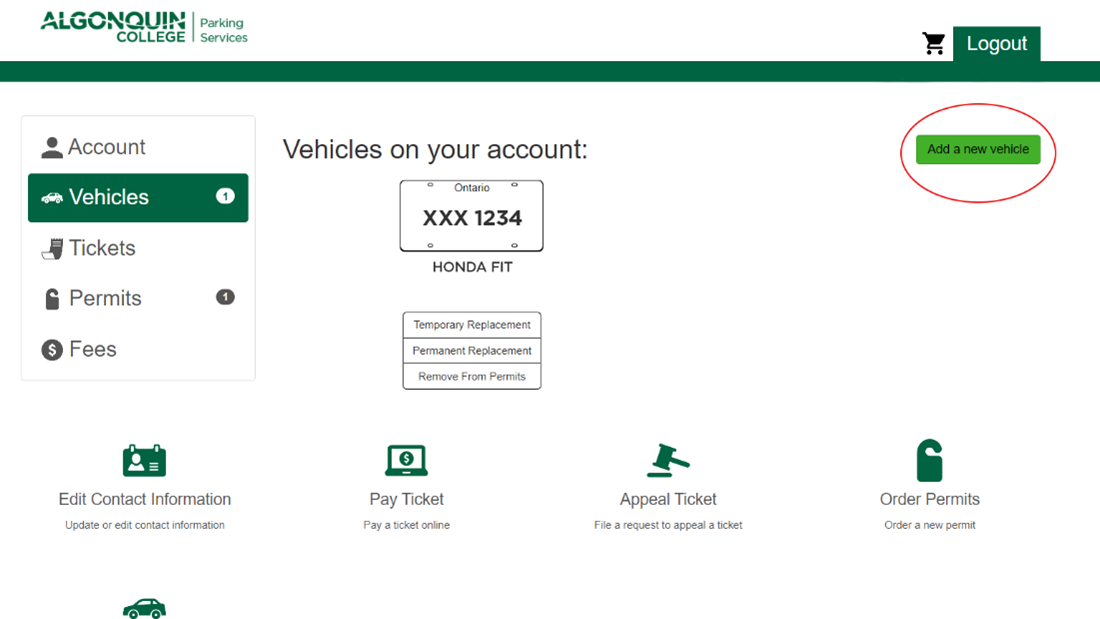
Image of add a new vehicle on Parking website.

If you have any questions about parking on campus, please connect with us at parking@algonquincollege.com or in room E120 on the Ottawa Campus.

Visitor Lot (Lot 7) goes cashless, adds debit as a payment option

Visitor Lot Equipment Upgrade image of car at parking gatesDuring the week of April 15, Algonquin College Parking Services is completing parking lot upgrades in the Visitor Lot (Lot 7) and Lot 4.

Part of these upgrades is to install new parking gates, with increased security, that allow for payments by credit, debit, access card, and guest pass. Cash payments will no longer be accepted in this lot, but informed by customer feedback, the option to pay with debit has been added. Visitors paying by debit or credit will have the option to pay by inserting their card and entering a pin or tapping with their card or mobile device.

For those who have purchased Visitor Lot guest passes to be used by guests to the College, you would have already received an email with instructions on how to replace those passes as old passes will stop working on April 22, 2024. If you did not receive an email, please complete this form and our team will be in touch to replace your passes.

During this time of transition, our team will be monitoring activity in the lot and will be assisting customers should they experience difficulties.

If you have any questions, please contact us at parking@algonquincollege.com.