Registration Steps and Important Dates
Need a General Education (GenEd) or Degree Breadth elective this semester? Check your program requirements, explore your options, and follow the registration steps below.
Winter 2027 registration
Early course selection opens October 26, 2026.
Submit your course preferences by November 15. Then check your timetable during the timetable change period to confirm that you have an elective.
In an AC Online program?
AC Online students follow a separate registration process. Visit the AC Online registration page and complete the AC Online General Elective Selection Form.
1. Check whether you need an elective
Find your program’s course list and check the level you will be taking. Look for a General Education or Degree Breadth elective requirement.
Find your program and course list
Not sure, or need an elective from an earlier level? Contact your program coordinator to confirm what you need.
Already have an approved exemption? You do not need to select or register for the elective covered by that exemption.
2. Explore your course options
Browse the course descriptions to find subjects that interest you. Not every course is offered each semester or available to every program. ACSIS will show the options available to your program.
Explore GenEd and Degree Breadth courses
Choose a course you have not already successfully completed. Repeating the same course will not count as a second GenEd.
3. Register for Winter 2027
The process changes depending on the date. Find the period below and follow its instructions.
Before you begin
- Returning students: Your tuition fees must be paid or deferred before you can select or register for an elective.
- New students: If your Level 1 program includes an elective, you must first meet all conditions of your offer, including fee payment or deferral and any other admission requirements.
Choose your course preferences
October 26–November 15, 2026
- Log in to ACSIS.
- Select Gen. Ed. or Program Electives.
- Rank your available course choices and submit your preferences.
Submitting preferences does not complete your registration. After this period closes, the Registrar’s Office assigns courses. There is a short processing period while assignments are completed.
Your next step: Check your timetable during the timetable change period below.
Check your timetable and add a course if needed
December 7, 2026–January 11, 2027
- Log in to ACSIS and check your timetable.
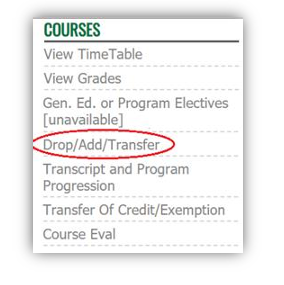
- If your required elective is missing, use Drop/Add/Transfer to add an available course. You must do this even if you submitted preferences earlier.
- Check the course schedule and select Confirm Changes to save your registration.
You are finished when your elective appears on your updated timetable.
Request late registration
January 12–22, 2027
You can no longer register through ACSIS during this period. Complete the form below to request a GenEd or Degree Breadth elective.
Complete the late registration request form
Submitting a request is not confirmation of registration. Check your timetable to confirm that your course has been added.
Need help?
If you cannot find an elective, have trouble registering, or have missed a registration deadline, contact your GenEd/Degree Elective Coordinator for guidance.
Find your GenEd/Degree Elective Coordinator
Include the following so we can help:
- Your student number
- Your program and level
- The semester you need the elective for
- A brief description of your question or problem
Could you qualify for an exemption?
If you have previous postsecondary education or relevant work and life experience, explore these options:
- Exemptions: Learn whether your previous education could meet your elective requirement.
- Prior Learning Assessment and Recognition (PLAR): Learn whether relevant knowledge and skills gained through work or life experience could qualify for course credit.