Generative AI: The Basics
Become comfortable with the basics by exploring these video and interactive tutorial resources.

How AI and Generative AI Works
This playlist offers both quick and in-depth videos for understanding the basics. Longer videos include chapters for browsing specific topics.

AI Pedagogy Project: metaLAB (at) Harvard
This interactive AI Guide not only describes AI basics, it has embedded versions of ChatGPT and Claude that you can play with.
On this page:
- What is GenAI?
- What is the Difference Between a GenAI Model and a GenAI Tool?
- Algonquin College’s GenAI Tool
- How “Smart” Are GenAI Tools?
- Creating Prompts
- What is GenAI Good At Doing?
- What is It Not Great At?
- Concerns Related to Training GenAI Models
What is GenAI ?
GenAI is a type of artificial intelligence that generates content usually in response to written prompts. All kinds of content can be generated including: text, images, videos, music, and programming code.
GenAI models are trained on very large datasets. Datasets for text generator tools are trained on books, articles, websites, and social media content – some of which may include copyrighted materials. Image, audio, and video generators are trained on extensive sets of images, audio and video clips. There is also the ability to upload your own content – which may or may not be added to the training model.
These models learn to recognize patterns in the datasets. It generates responses to queries (or “prompts”) through statistical analysis of the data input (e.g. distribution of words in a sentence or pixels in an image) and by identifying and repeating common patterns.
EXAMPLE: Prompt for Copilot
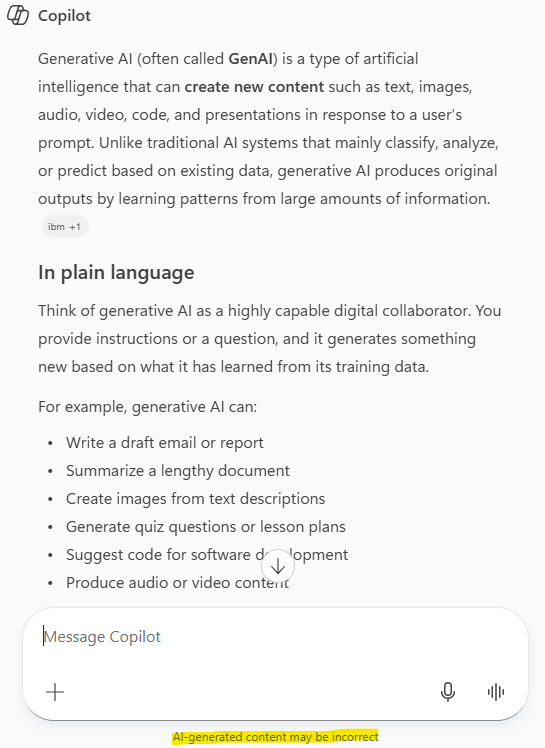
Copilot Chat Prompt was “What is Generative AI”.
NOTE: There is a small disclaimer under the text input box that says “AI-generated content may be incorrect”.
This recognizes that since AI tools generate content (rather than retrieve it from a source), this process can create wrong information. The results will be based on statistical probabilities and patterns within the training model.
GenAI tools are designed to answer your prompt and present results back to you with a helpful, confident style – even if it is wrong. Therefore, it is very important to always review the content generated by prompts.
Agentic AI
GenAI tools have evolved to include AI agents which undertake actions autonomously in order to complete specific tasks. For example, a specially designed agent within ChatGPT could operate on your behalf to access computer applications and complete tasks such as planning a vacation.
Since AI agents act on your behalf, their use comes with risk in terms of privacy, security, and impact of errors. Their use are generally reserved to advanced AI users and specially designed IT environments with comprehensive protocols and parameters.
What is the Difference Between a GenAI Model and a GenAI Tool?
A GenAI model is the technology (e.g. algorithms) that enables content generation.
A GenAI tool is a service or user interface that allows you to interact with the GenAI model.
 ChatGPT is a popular example of a tool that includes a type of GenAI model called a Large Language Model (LLM). LLMs enable you to ask the tool questions and get responses back in natural language.
As ChatGPT evolved over time, each newer version became a bit more powerful and well suited to complicated tasks such as deep research, complex data analysis and problem solving. But not every task requires the computing resources of the more evolved models. When you type in a prompt, ChatGPT will judge the complexity of the task and assign the appropriate version of model in order to operate more efficiently.
There are various other GenAI tools out there including Copilot (Microsoft), Gemini (from Google) and Claude. Similar to ChatGPT, each of these tools have different model versions and supporting tools.
Algonquin College’s GenAI Tool
Algonquin has an approved version of Microsoft Copilot that is available for all faculty, students, and staff to use.
Learn more about Algonquin’s Microsoft Copilot.
How “Smart” Are GenAI Tools?
As LLMs (Large Language Models), tools such as Copilot and ChatGPT, have an interface that supports human-like conversations. Therefore, it can be easy to assume that they are always correct and reliable.
These tools generally do a good job at providing content. Though, it is helpful to remember that GenAI tools do not “know” things. Rather, their models “generate” content based on patterns and probabilities. This means that generated results can include errors. They can “present incorrect guesses with the same confidence as they present facts.” Furthermore, “…they are designed to be plausible (and therefore convincing) with no regard for the truth” (Véliz, 2023).
Accuracy of generated results continues to improve with each model update. However, it is still prone to making up certain kinds of information – including references. It often misses important contextual nuance and includes implicit bias from training data that prioritizes western ways of knowing and being. This means that critically evaluating the quality, accuracy and perspective of generated output is important.
Creating Prompts
When you ask a GenAI tool to do something, your typed (or spoken) instruction is called a prompt. You will engage in conversation with Copilot or ChatGPT to guide it towards the results you are looking for.
The process of creating prompts has been coined prompt engineering – but don’t let this term intimidate you. It simply reflects that you can instruct the GenAI tool to do certain things.
The general practice involves explaining:
- The Problem: Describe what your need is.
- The Output Structure: For example: “Answer in a bulleted list,” “Respond in fewer than 100 words,” “Provide three examples”, “Answer in the form of a limerick”
- The Communication Tone, Style, or Personality: Basically, how you want it to communicate with you. For example, “answer the question as a patient math teacher”. Also, provide contextual details, unique knowledge, or special tools that they might need to meet your request.
Elements of a good prompt may include:
- Role: Tell the AI who it is. Context helps the AI produce more tailored results. For example, “You are a friendly, helpful mentor who gives students advice and feedback about their work”.
- Goal: Tell the AI what you want it to do. For example: “Give students feedback on their [project outline, assignment] that takes the assignment’s goal into account and pinpoints specific ways they might improve the work.”
- Step-by-step instructions. Providing brief instructions can be effective. You can try this to get the specificity that you want.
- Add your own constraints. You can specify the kinds of things that you do not want to see in the results.
Additional Resources
View these resources for more information:
- How to approach prompting of AI chatbots (University of Kansas, Center for Teaching Excellence)
- A Teacher’s Prompt Guide to ChatGPT Prompt ideas for various teaching and learning activities.
- Prompt Library – AI for Education A comprehensive library of prompts from AI for Education.
What is GenAI Good at Doing?
Tools like ChatGPT can significantly speed up work processes and improve the quality of work. They are great for:
- Brainstorming ideas (e.g for assignments, discussion questions etc.)
- Answering questions
- Explaining things in easy to understand ways
- Summarizing and outlining information
- Composing first drafts (e.g. emails, papers. social media posts etc.)
- Preparing test questions and evaluation rubrics
- Proofreading written work
- Critiquing your work and offering suggestions
- Translating text to different languages (though is not completely fluent in every language)
- Analyzing data
- Helping to write or debug computing code
What is It Not Great At?
As a predictive model that prepares results based on algorithms, GenAI lack common sense, emotional intelligence, and an understanding of the nuances of natural human language. They can take on human-like conversational styles when presenting information. However, the results may not always be correct.
Therefore, ChatGPT is not good at:
- Always providing correct information. It can make up information – including resource citations that do not exist.
- Providing context-specific information (though this may be mitigated by including context cues within your prompts)
- Output may be biased based on what is in the training dataset and how it was fine-tuned.
Concerns Related to Training GenAI Models
Impact on the Environment
It is estimated that the training of GPT3 used 1,287 megawatt hours of electricity and generated 552 tons of carbon dioxide – or the equivalent of driving 123 cars for one year (Generative AI Hub, UCL). The immense processing power required to train these models creates a large carbon footprint.
Human Costs
Part of the data training process for GenAI models, before they are used, includes a refinement process called Reinforcement Learning from Human Feedback (RLHF). This involves having individuals review GenAI responses for accuracy and appropriateness. This includes reviewing for alignment with “guardrail” criteria to prevent the generation of objectionable material. During the development of ChatGPT, RLHF reviewers were outsourced labourers from countries, like Kenya, and were paid less than $3 per hour to review data that included disturbing content.
There are other important GenAI use considerations including bias and negative stereotypes in datasets, concerns about equitable access to the the technology, data security and privacy as well as accuracy of output. Though, these issues are being actively worked on and improvements are being made.
A Quickly Changing Landscape
The dynamic, self-learning nature of these tools coupled with a competitive, evolving AI marketplace has created a context of constant, rapid change. The ChatGPT, Copilot, or Adobe Firefly tools that you use today is not the same as it was a few months ago. Training and tuning of AI models may improve performance in certain ways while modifying behaviour in others.
The good news is that using GenAI tools for regular kinds of queries and tasks is not difficult and will likely become easier for the average person. Especially as they are incorporated into other tools we are familiar with. For example, Microsoft’s integration of Copilot into Office365 programs such Outlook email, MS Word, PowerPoint, and Excel.
We need to be mindful and reflective in our use of GenAI tools. It will be important to try out these dynamically changing tools and consider what appropriate, effective use looks like within different contexts.
References
Generative AI Hub (n.d.) Retrieved August 21, 2026, from https://www.ucl.ac.uk/teaching-learning/generative-ai-hub/introduction-generative-ai
Véliz, Carissa. (2023, August 1). What Socrates Can Teach Us About AI. Time. https://time.com/6299631/what-socrates-can-teach-us-about-ai/